Power On & Off
Please boot up the printer before printing.
Warning
At the very beginning, please check the environment before starting the device.
Power On
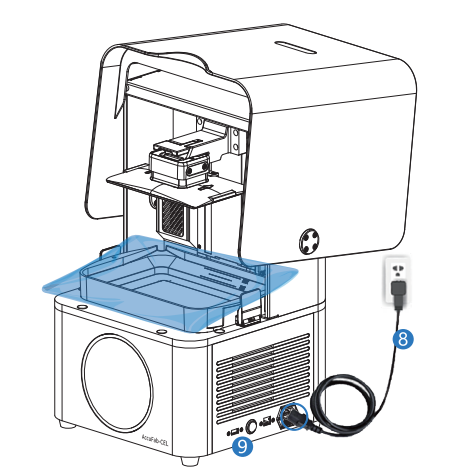
- Connect the power cable ⑧ to the printer.
- Press the power button ⑨ on the right side to wake up FabWare.
- The printer will beep once and display the SHINING 3D startup screen on the touch screen.
Caution
To avoid the risk of electric shock, this equipment must only be connected to a supply mains with protective earth.
Note
- For the first startup, the software will walk you through the User Guide.
- For subsequent startups, the software will enter the Home interface after being powered up.
Power Off
Press the power button ⑨ on the right side to shut down FabWare.