Project Management
After connecting the scanner and entering the scanning interface, you can manage the projects in the currently created or opened project group. Each project is a part of the project group. You can use these buttons to manage projects.
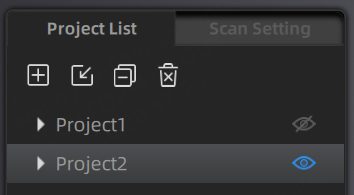
| Function | ||
|---|---|---|
 New Project |
Click this button to create a new project when the scanner is connected. | In Laser Mode, if the project group contains a project scanned with Feature Alignment, you cannot select other alignment modes (Marker Alignment or Global Marker Alignment) for the new project. |
 Open Project |
Click this button to import a project. | |
 Remove Project |
Click this button to remove the project from the project list. | The project remains in the folder and can be imported back to the list. |
 Delete Project |
Click this button to delete the project. | This operation will delete the selected project and its data at the same time. |
 Visible / Invisible |
Click this button to show or hide the data or markers. |
Note
- If the project being deleted or removed is the last project in the list (i.e., the current project), the previous project in the list becomes the current project, and you can perform scanning operations on it.
- If a project with the same name as an existing project in the list is opened from a different path, "_1" will be appended to the name of the opened project.
- If a project is imported into the project group from a different path, deleting it will not affect the original data in the original path. Only the project data copied to the project group folder will be deleted.