Connection
Caution
Please make sure you are using the correct power adapter.
Steps
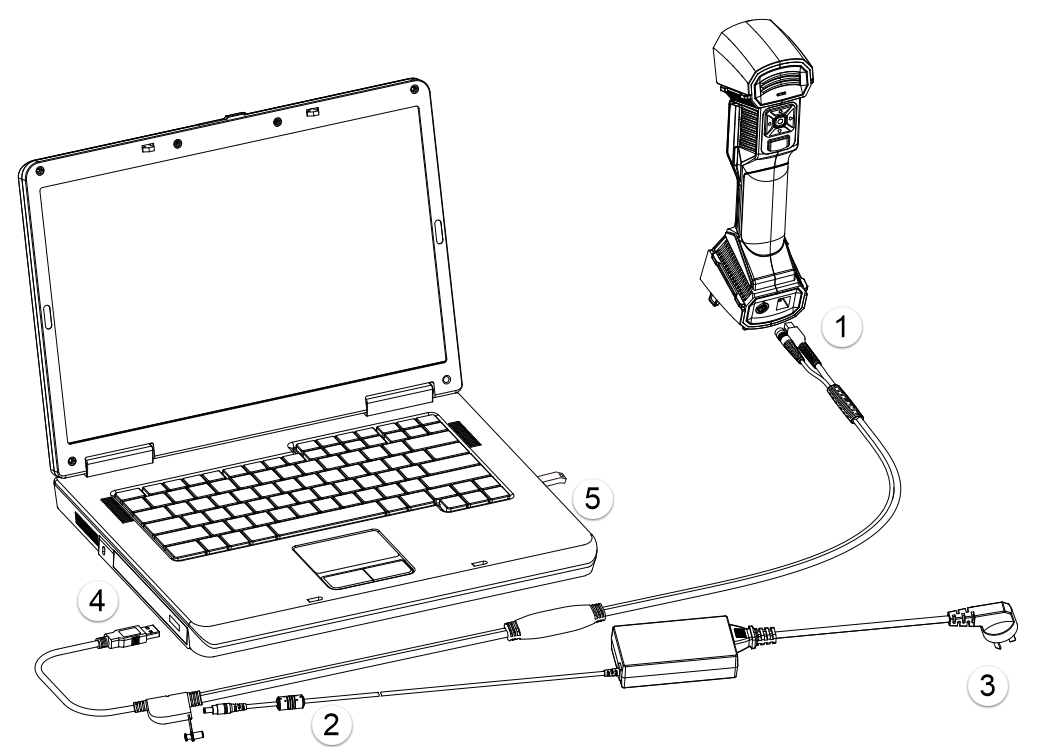
- Connect aviation cable (4) to power port and USB port on the scanner.
- Connect power cord (3) and the power adapter (2).
- Connect power adapter (2) into aviation cable (4).
- Connect USB port on the aviation cable to the PC USB 3.0 port.
- Insert the Dongle (5) into the PC USB port.
- Plug in a socket to power up.
Note
- If you need to use the full functionality, please insert the dongle.
- If you don't insert the dongle and only connect the device, the software will automatically enter the guest mode when you start it.
- If you don't insert the dongle and don't connect the device, the software will automatically enter guest mode after selecting the device type.