FreeProbe Operation
Installation
- Insert the battery into the slot at the bottom of the device.
- Press the button on the left rhombic button to turn on. The indicator will turn cyan after powering on. For more button operations, please refer to FreeProbe's appearance.
Connection
- Power on the probe and wait for its indicator to become cyan.
- Run the FreeScan Trak software.
-
Select Probe Mode to open the third-party software.
Note
- After selecting the probe mode, the third-party software opened in the software defaults to Polyworks Metrology Suite. If you need to change the opened third-party software, you can change it through the settings on the upper right side of the software.
- The third-party software currently supported by the probe mode of this software is Polyworks Metrology Suite (2003) and Geomagic Control X (2023.1).
-
Connect to the probe in the third-party software and wait for the probe's indicator to become green.
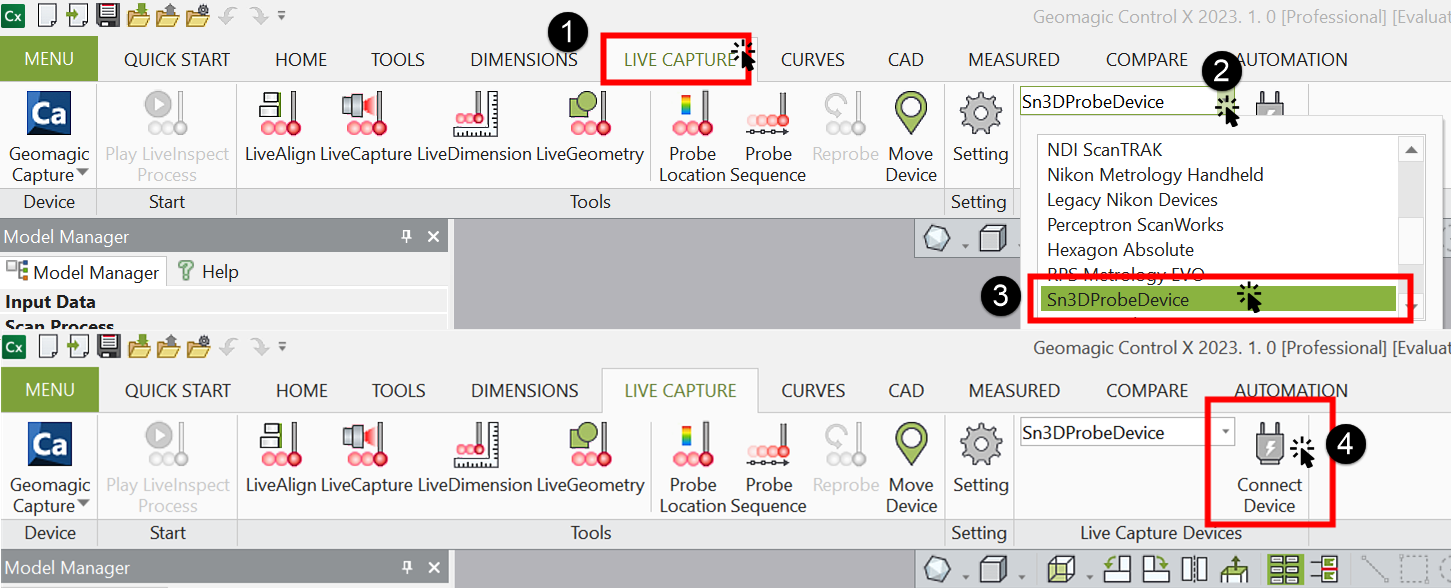
How to connect the probe in Geomagic Control X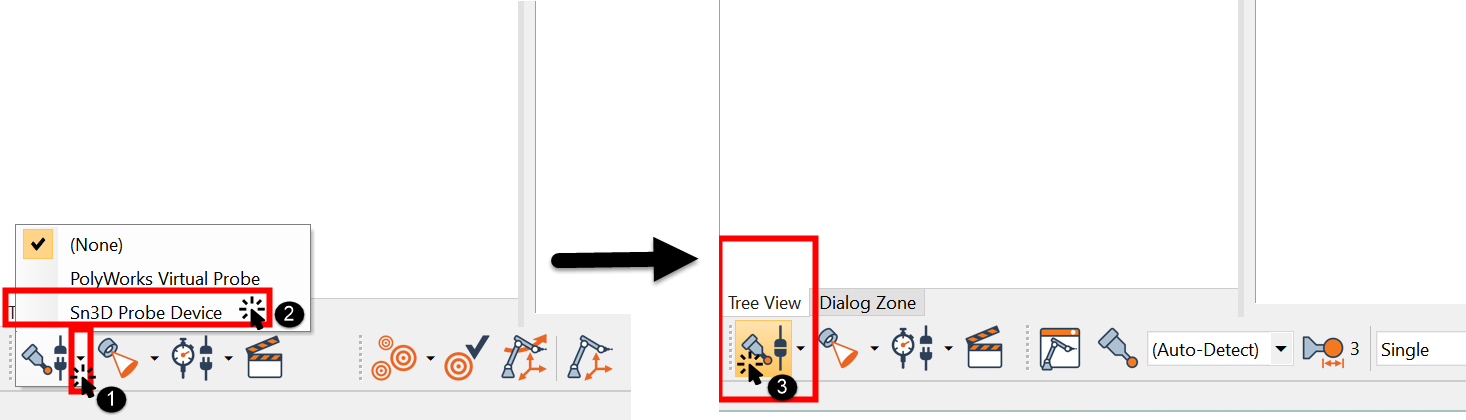
How to connect the probe in Polyworks Metrology Suite
Note
- If the probe cannot connect successfully, please open Network & Internet > Mobile Hotspot and set the network band to 2.4GHz.
- If you are using a desktop computer, you can turn on the mobile hotspot by inserting a wireless network card. If the mobile hotspot cannot be turned on after inserting the wireless network card, please contact technical support.
Calibration
When the probe has not been used for a long time or its accuracy has decreased, please perform Probe Calibration before use.
Add Points & Measurement
Steps
- Select Trak Mode to scan and finish mesh optimization.
- Select the third-party software to be opened in
 > Probe Setting, and the scanned model files will be automatically imported into the opened third-party software.
 - Now you can use the probe to add feature points and do measurement in the opened third-party software.
Note
- Please exit the third-party software before continuing to use the FreeScan Trak software.
- You can directly input the existing model to Polyworks to add feature points and measure.
- To add feature points with the Probe, ensure its tip is within the range of the FreeTrak 's camera and in the same plane as the camera. Gently poke at the object to be measured, and click the functional buttons.