Scan Preparation
Before scanning, please refer to the following scanning requirements and make the necessary preparations to enhance your scanning experience.
Markers Placement
When scanning using Marker Alignment or Global Markers, markers need to be placed on the object to be scanned in advance.
-
Please note the following requirements for placing markers:
- Place markers evenly and randomly.
- Do not use damaged or incomplete markers.
- Do not place markers on surfaces with high curvature.
- Do not use dirty or contaminated markers.
- Place small markers on edges of models or small areas.
Col
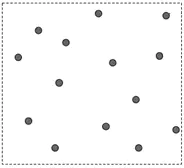 correctly attached markers
Col
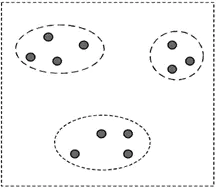 Wrong: Artificial grouping of markers
Col
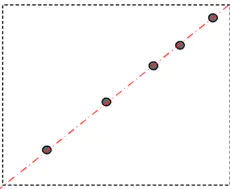 Wrong: Markers are attached in only one line
Objects
-
Please note the following requirements for scanning objects:
- For scanning transparent, shiny, or reflective objects (especially those with black reflective surfaces), use washable or vanishing scanning spray.
- For objects lacking surface features or with repetitive features:
- Place markers on the object's surface and select Marker Alignment mode for scanning.
- Randomly add rich geometric features on or around the object's surface and select Feature Alignment mode for scanning.
- Use an erasable marker to enhance surface features by drawing on the object's surface and selecting Texture Alignment mode for scanning.
Note
Types of objects unsuitable for scanning:
- Soft material object that cannot be hung.
- Lattice structures with many small deep holes.
- Moving or shaking objects. Frequent coordinate changes will lead to a poor scanning quality.