Software Installation
Before using the device, install the software using one of the following methods:
- Insert the USB flash drive into the computer, copy the installation package to the computer, then double-click to run it and follow the on-screen wizard to install the software.
- Log in to the Shining 3D Software Download Center, select the corresponding device to download the software, and follow the installation wizard to complete the installation.
Environmental Requirements
| Recommended Configuration | |
|---|---|
| Operating System | Windows 11 Professional (64-bit) |
| Processor | 13th Gen Intel® Core™ i7-13650HX or AMD Ryzen9 8945HS and above |
| Graphics Card | NVIDIA GeForce RTX 4060 and above |
| VRAM | 8 GB and above |
| RAM | 64 GB and above, DDR5 dual-channel |
| USB | USB 3.0 |
GPU
For a smoother scanning experience, an NVIDIA discrete graphics card is recommended.
Using a Discrete Graphics Card on a Desktop Computer
Connect the monitor to the discrete graphics card USB port on the back of the computer. The operating system will use the discrete graphics card by default.
Using a Discrete Graphics Card on a Laptop
-
Open the NVIDIA Control Panel.
-
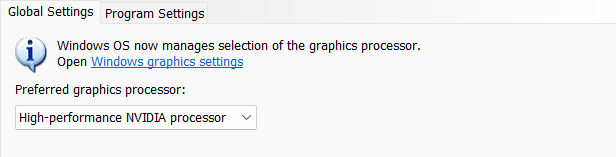
In 3D Settings > Manage 3D Settings > Global Settings, select High-performance NVIDIA processor and click Apply.
Caution
- Administrator privileges are required for software installation.
- The initial installation may take some time. Please be patient.
- If a driver abnormality occurs, open the Device Manager, uninstall the current driver, and reinstall it. If reinstalling the driver does not resolve the issue, please contact technical support promptly.
- TeamViewer is selected by default for installation along with the software. After installation, you can launch the software and click
 > Support > Remote Assistance > TeamViewer to use TeamViewer for remote assistance. If you do not need remote assistance for now, you can uncheck TeamViewer during installation, and it will not be automatically installed. You can download TeamViewer later from the TeamViewer official website.